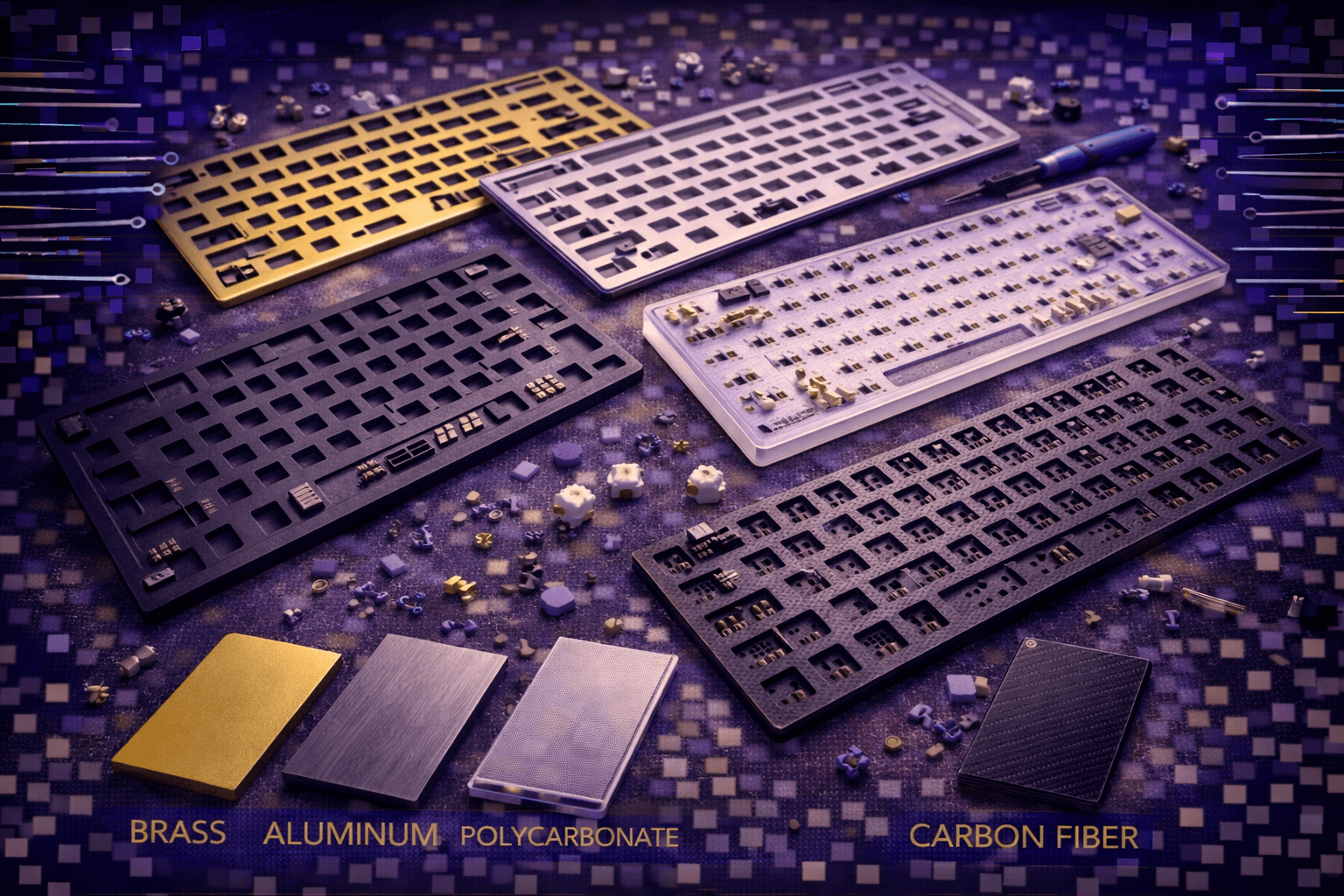
Keyboard plates form critical structural component sandwiched between keycaps and PCB, profoundly influencing typing feel, sound signature, and switch stability through material selection and design. Understanding plate characteristics—from rigid brass delivering maximum stability to flexible polycarbonate creating bouncy typing—enables optimization of mechanical keyboard experience matching personal preferences.
Plates serve multiple essential functions: structural support maintaining switch alignment and preventing wobble, acoustic influence shaping sound through vibration transmission properties, typing feel determination through flex characteristics, and aesthetic contribution via visible plate edges and material choices.
This comprehensive guide explores keyboard plate materials (aluminum, brass, polycarbonate, FR4, carbon fiber, POM) analyzing sound properties and flex behavior, explains plate mounting styles affecting typing experience, discusses plateless designs and their unique characteristics, covers half-plate and other design variations, and helps match plate selection to switch types and personal preferences.
Whether building custom keyboard, evaluating pre-built quality, or considering plate upgrades, understanding plate fundamentals enables informed material choices creating desired typing feel and acoustic signature.
Note: This guide contains affiliate links. If you purchase through our links, we may earn a commission at no extra cost to you. This helps support our testing and content creation.
Keyboard Plate Materials Overview
Aluminum (Most Popular All-Around)
Material Properties:
- Moderate rigidity with slight flex possible depending on thickness
- Lightweight yet structurally sturdy
- Excellent durability resisting damage
- Most common plate material in custom keyboards
- Mid-range cost ($20-40 typical)
- Easy to manufacture via CNC or die-casting
- Industry standard for balanced performance
Aluminum Types:
- 6061 aluminum (most common): Good balance of workability, cost, and structural properties
- 7075 aluminum (aerospace grade): Harder, more rigid, more expensive, premium option
Standard Thickness: 1.5mm (universal switch compatibility)
Sound Characteristics: Balanced clean acoustic profile. Not excessively bright, not overly muted. Clear distinct keypress sounds. Slight metallic ping possible with specific switch types. Overall controlled resonance.
Typing Feel: Firm but not harsh. Slight flex possible depending on mounting style and thickness. Good tactile feedback transmission. Comfortable for extended typing sessions. Most users find aluminum feel satisfying.
Best Applications: Recommended for most users seeking balanced experience. Excellent all-around choice. Default recommendation for first builds or upgrading.
Value Proposition: Excellent balance of cost, performance, sound, and feel. Best cost-to-benefit ratio among plate materials.
Brass (Premium Rigid Deep Sound)
Material Properties:
- Very rigid minimal flex
- Heavy weight material
- Extremely durable and scratch-resistant
- Unique deep distinctive sound signature
- Expensive ($40-80+ per plate)
- Develops patina over extended time adding character
- Premium aesthetic and prestige
Standard Thickness: Usually 1.5mm, some manufacturers offer 2mm options
Sound Characteristics: Deepest thockiest sound possible. Maximum bass frequencies and bass response. Very controlled acoustic profile with minimal unwanted resonance. Reduces high-frequency harshness. Creates premium satisfying acoustic experience. Most bass-forward material available.
Typing Feel: Very firm and solid typing experience. Essentially zero flex. Precise detailed tactile feedback. Heaviest feeling bottoming out creating substantial desk presence. Some users find very firm feel slightly harsh.
Best Applications: Users actively seeking deepest sound possible. Those preferring very firm typing experience. Premium custom builds. Sound enthusiasts. Don't mind weight and cost investment.
Aesthetic Appeal: Brass develops unique patina over time adding vintage character and uniqueness to keyboard.
Polycarbonate / PC (Flexible Soft)
Material Properties:
- Flexible allows noticeable bouncy typing
- Lightweight material
- Good impact resistance and durability
- Affordable cost ($15-30)
- Clear or frosted options for RGB showcase keyboards
- Allows mounting style flex to be maximized
Standard Thickness: Usually 1.5mm
Sound Characteristics: Softer muted sound profile. Less harsh than metal materials. Absorbs vibrations through flexibility creating smoother acoustic signature. Creates refined controlled acoustic profile. Reduces case ping and metallic ringing.
Typing Feel: Noticeably bouncy and flexible. Significant plate flex felt when typing. Soft forgiving bottoming out. Very comfortable for extended typing reducing finger impact stress. Some users find flex creates mushy unprecise feel.
Best Applications: Users preferring soft bouncy typing feel. Gasket-mount keyboards (combines with gasket flex for maximum effect). Budget-conscious users seeking flexible option. RGB showcase builds using clear polycarbonate. Those valuing comfort over precision.
Synergy: Polycarbonate plates maximize gasket mounting benefits creating ultimate soft typing experience.
FR4 (Fiberglass Balanced Budget)
Material Properties:
- Moderate rigidity balanced between metal and plastic
- Good durability for general use
- Affordable cost ($10-25)
- Same material as PCBs (fiberglass-epoxy composite)
- Greenish-brown natural color
- Easy to manufacture and reliable
Standard Thickness: Usually 1.6mm (standard PCB thickness)
Sound Characteristics: Balanced neutral acoustic profile. Similar to aluminum but slightly more muted. Good acoustic properties without premium cost. Clean clear sound without harshness. Good compromise between aluminum brightness and plastic dampening.
Typing Feel: Firm with moderate give. More forgiving than brass or thick aluminum, firmer than polycarbonate. Good middle ground feel balancing precision and comfort. Suitable for all typing styles.
Best Applications: Budget-conscious builds. Users wanting balanced feel without premium cost. Value-oriented enthusiasts. Custom keyboard kits offering FR4 options.
Value Proposition: Excellent budget option providing balanced performance approaching aluminum quality at lower price.
Carbon Fiber (Exotic Premium Rigid)
Material Properties:
- Very rigid lightweight (lighter than aluminum despite rigidity)
- Unique modern aesthetics
- Excellent durability and scratch resistance
- Complex manufacturing difficult and expensive
- Expensive ($50-100+ per plate)
- Visible carbon weave texture adds visual appeal
Standard Thickness: Usually 1.5mm
Sound Characteristics: Unique deep muted sound profile. Different acoustic character from any other material. Absorbs specific vibration frequencies creating distinctive profile. Some describe as "musical" or "refined."
Typing Feel: Rigid like brass but lighter weight reducing hand strain. Precise solid feel. Good tactile feedback. Very firm typing experience without weight penalty of brass.
Best Applications: Enthusiasts actively seeking unique material and aesthetic. Premium exotic builds. Those wanting carbon fiber properties specifically. Don't mind premium cost.
Visual Appeal: Carbon weave visible through frosted cases creates modern premium appearance.
POM / Delrin (Smooth Plastic)
Material Properties:
- Smooth low-friction plastic material
- Moderate flexibility
- Good durability for extended use
- Mid-range cost ($25-45)
- White or cream natural color
- Acetal plastic smooth characteristics
Standard Thickness: Usually 1.5mm
Sound Characteristics: Smooth muted sound profile. Very quiet typing experience. Excellent vibration absorption through material properties. Creates refined controlled acoustic signature. Minimal harshness or metallic character.
Typing Feel: Smooth and forgiving. Noticeable give creating bouncy yet stable feel. More give than aluminum, similar to or less than polycarbonate. Comfortable for extended typing reducing impact stress.
Best Applications: Users actively seeking quiet typing. Those preferring smooth material feel. Comfortable extended typing priority. Office environments requiring quiet keyboards.
Acrylic (Visual Showcase)
Material Properties:
- Transparent or translucent material
- Moderate rigidity
- Brittle material (cracks if dropped or stressed)
- Moderate cost ($20-40)
- Clear showcasing switch mechanisms and internals
- RGB lighting shines through clearly
Standard Thickness: Usually 1.5mm
Sound Characteristics: Clear bright sound. Emphasizes switch acoustics allowing each keypress detail audible. Can create pingy or resonant character. Less controlled than metal, brighter than other plastics.
Typing Feel: Firm with occasional flex depending on thickness and mounting. Less forgiving than flexible plastics. More responsive than rigid metals.
Best Applications: RGB and visual enthusiasts. Users prioritizing aesthetic showcase over acoustic optimization. Those wanting to display internal components visually.
Practical Consideration: Brittleness requires careful handling and protection from drops.
Keyboard Plate Sound Characteristics
Material Sound Rankings
Deepest/Thockiest to Brightest/Clackiest:
-
Brass: Maximum thock, deepest bass frequencies, most controlled resonance. Premier choice for deep sound.
-
Carbon Fiber: Deep unique signature, excellent vibration dampening, refined profile.
-
FR4: Balanced deep character, good neutral foundation, excellent price-to-quality ratio.
-
Aluminum: Balanced clean sound, slight brightness, controlled, industry standard.
-
POM: Smooth muted character, quiet typing, excellent vibration absorption.
-
Polycarbonate: Soft dampened response, muted clack, flexible material benefits.
-
Acrylic: Bright clear sound, emphasizes switches, resonant character, least dampened.
Acoustic Property Explanation
Rigidity and Sound: Rigid materials (brass, carbon fiber, aluminum) create more controlled sound through superior vibration control. Vibrations dampen quickly preventing excessive resonance. Flexible materials (PC, POM) absorb vibrations through flexibility creating softer acoustic profile.
Material Density: Denser materials (brass) create deeper lower-frequency sounds through effective vibration dampening. Less dense materials (PC, acrylic) emphasize higher frequencies and brightness creating different acoustic character.
Vibration Transmission: Metal plates transmit vibrations efficiently to case structure. Plastic and composite plates absorb more vibration energy internally reducing case resonance. Different transmission characteristics produce distinctly different final sound.
Damping Factor: Each material has inherent damping properties. Brass naturally highly dampened. Acrylic naturally vibrant. Material properties determine final acoustic signature independent of other factors.
Switch Type Interaction With Plate Material
Linear switches + brass plate: Maximum thock combination. Deep satisfying bottom-out sound. Premium pairing.
Linear switches + polycarbonate plate: Softer muted sound. Less aggressive acoustic profile. Very different character from brass.
Tactile switches + aluminum plate: Clear tactile bump feedback audible. Balanced acoustic response emphasizing mechanical feel.
Tactile switches + FR4 plate: Balanced tactile sound without excessive harshness. Good all-around combination.
Clicky switches: Plate material less impactful—click mechanism dominates sound regardless of plate choice. Plate influences bottom-out only.
Plate material significantly affects final sound even with identical switches and keycaps.
Keycap Material Synergy
PBT keycaps + brass plate: Deep thocky premium combination. Both materials emphasize bass frequencies. Creates richest sound.
ABS keycaps + aluminum plate: Brighter clackier combination. Both materials higher-pitched. More aggressive sound.
PBT keycaps + polycarbonate plate: Muted quiet combination. Maximum sound dampening. Very quiet typing.
Material pairing matters: Complementary materials create cohesive acoustic profiles.
Case Material Interaction
Plate sound influenced and colored by case material:
Aluminum case + brass plate: Very deep premium sound. Metal-on-metal creates excellent controlled acoustics. Premium pairing.
Plastic case + polycarbonate plate: Very muted quiet. Both materials dampen creating subdued acoustic profile. Good for office/quiet environments.
Aluminum case + polycarbonate plate: Balanced hybrid. Metal case adds depth, plastic plate adds smoothness. Good compromise.
Acrylic case + acrylic plate: Bright transparent combined. Maximum case resonance with minimal dampening.
Case and plate together create final acoustic signature through combined material properties.
Typing Feel and Flex Characteristics
Flex Categories
Very Rigid (No Flex):
- Brass plates provide essentially zero flex
- Thick aluminum (2mm+) extremely rigid
- Carbon fiber very stiff
- Typing feel: Very firm solid precise. No give whatsoever. Maximum stability. Some users find slightly harsh.
Moderate Rigidity (Slight Flex):
- Standard aluminum (1.5mm) slight flex possible
- FR4 moderate flex depending on mounting
- Acrylic similar moderate flex
- Typing feel: Firm but forgiving. Slight cushioning. Comfortable for extended typing. Most popular feel range.
Flexible (Noticeable Flex):
- Polycarbonate very flexible
- POM notably flexible
- Thin plates (<1.2mm) very bouncy
- Typing feel: Bouncy soft. Noticeable give when typing. Very forgiving reducing finger fatigue. Some find mushy or imprecise.
Flex Benefits
Comfort: Flexible plates reduce impact stress on fingers during extended typing sessions. Forgiving bottoming out reduces fatigue.
Sound: Flex creates unique acoustic characteristics. Some prefer bouncy feel producing different sound profile. Dynamic response affects acoustics.
Gasket Enhancement: Flexible plates maximize gasket-mount benefits. Gaskets create flex, flexible plates amplify effect. Synergistic combination.
Tactile Feel: Some argue flex enhances tactile switch feedback through dynamic response. Keys feel more lively and responsive.
Personal Preference: Many users prefer softer bouncy feel despite sacrificing some precision. Comfort often prioritized over mechanical accuracy.
Flex Downsides
Stability Concerns: Excessive flex reduces switch stability. Keys can feel inconsistent or wobble. Reduces mechanical precision.
Preference Divide: Many users prefer firm precise feel over bouncy flex. Highly subjective with strong opinions both directions.
Switch Compatibility: Heavy switches (67g+) on very flexible plates can feel unstable or inconsistent bottoming out. Weight and flex mismatch problematic.
Precision Loss: Flex can reduce precision for rapid typing. Professional typists often prefer firmness.
Mounting Style Interaction With Flex
Gasket mount + flexible plate: Maximum flex and bounce. Very soft forgiving typing. Ultimate softness. Popular premium combination.
Gasket mount + rigid plate: Reduced flex—gaskets provide some give but rigid plate limits total flex. More controlled feel.
Tray mount + flexible plate: Some flex possible but mounting style limits effectiveness. Attachment points reduce actual flex.
Tray mount + rigid plate: No flex whatsoever. Very firm typing. Traditional mechanical keyboard feel. Direct responsive.
Mounting style significantly affects actual flex independent of plate rigidity rating.
Personal Preference Spectrum
Prefer firm typing: Brass, thick aluminum (2mm+), carbon fiber plates. Tray or top mount. Professional typists often here.
Prefer balanced: Standard aluminum (1.5mm), FR4 plates. Any mounting style. Most users satisfied with this.
Prefer soft bouncy: PC, POM plates. Gasket or isolated mount. Comfort priority over precision. Growing preference segment.
No objectively "best" flex—purely personal preference based on individual typing style, hand strength, comfort priorities, and aesthetic preferences. Test and experience before committing to plate choice.
Plate Mounting Styles
Stabilizer Integration Methods
Plate-Mounted Stabilizers: Stabilizers clip into plate. Plate supports both switches and stabilizers together. Common design. Easier assembly.
PCB-Mounted Stabilizers (Screw-In): Stabilizers attach to PCB only. Plate has cutouts allowing stabilizer passage. More stable overall. Preferred by enthusiasts. Requires plate removal for stabilizer service/replacement.
Hybrid Approaches: Some designs allow both mounting options. Extra flexibility for customization.
Mounting Points Variations
Full Perimeter Mounting: Plate screws to case around entire edge. Very rigid minimal flex. Direct force transmission to case.
Strategic Points Only: Plate attaches at specific locations only (often 4-6 points). Allows more flex. Common in gasket-mount designs. Reduces direct case interaction.
Floating Mounts: Plate suspended on gaskets or isolated mounts with no direct case contact. Maximum flex and isolation. Premium mounting approach.
Integrated vs Separate: Some cases integrate mounting directly, others use separate plate mounting hardware.
Plate Thickness Variations
1.2mm (Thin - Not Recommended): More flexible bouncy. Not standard. Can have switch compatibility issues. Some switches designed assuming 1.5mm.
1.5mm (Standard Industry): Universal compatibility. Balanced rigidity. Most common thickness. Industry standard. Recommended default.
2.0mm+ (Thick): Very rigid maximum stability. Limited switch compatibility—some switches don't fit or fit extremely tightly. Not recommended unless specific compatibility verified.
Stick with 1.5mm standard for maximum compatibility and balanced performance. Deviations create compatibility risks without significant benefit for most users.
Switch Compatibility Verification
Most switches designed for 1.5mm plates. Before choosing different thickness, verify specific switch compatibility. Manufacturers provide specifications.
Plateless Keyboard Designs
What Is Plateless Construction?
Keyboard construction without physical plate layer. Switches mount directly into PCB hot-swap sockets or solder to PCB with zero plate support structure.
Design Characteristics:
- Switch Wobble: More noticeable switch wobble without plate. Felt when typing and during keycap removal. Can feel loose or unstable.
- Sound: Very unique acoustic profile. Switch sound extremely clear and direct. No plate acoustic influence. Can sound hollow, crisp, or characterful depending on case.
- Typing Feel: Very soft flexible. Switches themselves provide all rigidity. Can feel loose or unstable to some users. Different from any plated keyboard.
- Visual Aesthetics: Exposed PCB visible between switches. Can look unfinished or showcase custom PCB designs depending on perspective.
Plateless Advantages
Unique Sound Profile: Distinctive acoustic signature impossible with plates. Purest switch sound without plate influence. Appeals to acoustic enthusiasts.
Maximum Flex: No plate rigidity limiting flex. PCB flex only limitation. Ultimate flexibility achievable.
Cost Savings: Eliminates plate component and associated manufacturing. Reduces build cost.
Customization Flexibility: Can add custom plate later if desired. Test build versatility.
Pure Switch Experience: Switch characteristics unmodified by plate. Purest mechanical experience.
Plateless Disadvantages
Stability Concerns: Switch wobble annoying for many users. Keys feel loose without plate support. Reduces mechanical confidence.
Durability Questions: Switches rely only on solder joints or hot-swap sockets without plate reinforcement. Potential long-term reliability issues.
Limited Appeal: Many prefer plate-mounted keyboards for stability, refinement, and proven reliability.
Build Complexity: Requires specific PCB design and switch compatibility. Not universal approach.
Most keyboards use plates for good reason—stability and refinement plates provide valued by vast majority of users.
Half-Plate and Design Variants
Half-Plate Configurations
Plate covering only portion of keyboard—typically alphas (letter keys) with modifiers plateless or vice versa.
Purpose:
- Create different acoustic profiles for different keyboard sections
- Flex where wanted, maximum rigidity where needed
- Experimental unique designs
- Weight and cost optimization
Sound Characteristics: Plated section sounds conventional. Plateless section produces different character. Creates acoustic variety across keyboard. Some find interesting, others find inconsistent.
Typing Feel: Noticeable difference between sections. Can feel strange or jarring initially but some users enjoy variation. Dynamic typing experience.
Practical Application: Experimental niche. Not recommended for first builds. Stick with proven designs.
Flex Cut Designs
Strategic cuts or slots in solid plate allowing controlled flex. Rigid material behaves more flexibly through geometric modification.
Purpose: Create flex characteristics of flexible material using rigid material properties.
Examples: Aluminum plates with slots allowing specific flex areas. Carbon fiber with cutouts.
Effectiveness: Variable. Some designs excellent, others ineffective. Requires precise engineering.
Other Variants
Multi-Material Plates: Different materials combined in single plate. Rare and experimental. Complex manufacturing.
Weight-Reduced Plates: Material removed creating lighter weight while maintaining structural integrity.
Variable Thickness Plates: Thicker in high-stress areas, thinner where flex desired. Extremely rare and expensive manufacturing.
Practical Reality: Vast majority of keyboards use standard full plates with consistent properties. Variants remain experimental or enthusiast niche. Not recommended for first builds or users seeking proven reliability.
Switch Compatibility With Plates
Plate Thickness Requirements
MX-Style Switches: Designed for 1.5mm plates. Universal compatibility with 1.5mm standard.
1.2mm Plates: Potential tolerance issues. Some switches fit loosely. Switch stem clips may not engage properly. Not recommended for general use.
2.0mm+ Plates: Many switches won't fit. Others fit extremely tightly. Potential stem breakage risk. Requires specific compatibility verification. Not recommended unless absolutely necessary.
Universal Recommendation: Stick with 1.5mm standard ensuring maximum compatibility and avoiding unexpected issues.
Switch Type Compatibility
Plate-Mount (3-Pin) Switches: Require plate for stability. Two plastic side pins trimmed for plate-mount use. Work perfectly with plates. Unstable without plate.
PCB-Mount (5-Pin) Switches: Can technically work without plates but benefit significantly from plate support. Plastic side pins trimmed for plate use or pass through PCB mounting holes.
Optical Switches: No mechanical pins. Require optical sensors on PCB. Plate provides stability and feel benefits. Work fine with any plate thickness.
Compatibility Generally Universal with standard 1.5mm plates across switch types.
Plate Mount Points
Top Slot: All MX-style switches have standardized top slot. Plate clips into this slot providing stability.
Tight Fit: Quality plates provide snug fit preventing switch wobble. Poor quality plates allow loose movement.
Loose Fit: Indicates poor tolerance control. Quality issue. Avoid such plates.
Hot-Swap and Plate Interaction
Hot-swap sockets on PCB provide electrical connection. Plate provides mechanical stability and support.
Ideal Combination: Plate + hot-swap sockets. Easy switch replacement with mechanical stability benefits.
Plateless Hot-Swap: Possible but sockets bear all stress. Potential long-term reliability issues from socket wear and stress. Not recommended.
FAQ
Q: What's the best keyboard plate material overall?
A: Aluminum best all-around balance providing sound quality, typing feel, and cost. Brass for deepest thock (premium). PC for soft bouncy (comfort). FR4 for budget balanced. Personal preference matters most—no universal best. See materials section above.
Q: Does keyboard plate material actually affect sound significantly?
A: Yes, very significantly. Brass deepest most controlled. Aluminum balanced clean. PC muted soft. Acrylic bright clear. Material rigidity, density, vibration properties all fundamentally affect acoustic signature. See sound section above.
Q: What does plate flex mean and why does it matter?
A: How much plate bends when typing. Rigid plates (brass) zero flex—firm precise. Flexible plates (PC) noticeable bounce—soft forgiving. Flex affects comfort, sound, and typing feel. Personal preference determines ideal. See flex section above.
Q: Can I build keyboard without plate (plateless)?
A: Yes, plateless design possible creating unique sound. Causes switch wobble and unstable feel. Most users prefer plates for stability. Not recommended for first builds or those seeking proven reliability. See plateless section above.
Q: What plate thickness should I use?
A: 1.5mm is industry standard. Universal switch compatibility. Balanced rigidity. Don't deviate unless specific requirement. 1.2mm too flexible, 2.0mm+ has compatibility issues. Stick with standard 1.5mm. See mounting section above.
Conclusion
Keyboard plates fundamentally influence mechanical keyboard typing experience through material selection determining sound characteristics and flex behavior. Aluminum delivers balanced all-around performance suitable for most users seeking proven reliability. Brass provides premium deep thocky sound at higher cost appealing to acoustic enthusiasts. Polycarbonate creates soft bouncy typing appealing to comfort-focused users. FR4 offers budget-friendly balanced option maintaining quality.
Understanding flex preferences guides material selection—rigid plates (brass, thick aluminum) provide firm precise typing preferred by professional typists, flexible plates (PC, POM) create bouncy forgiving experience preferred by casual users. Mounting style interaction significant—gasket mount maximizes flexible plate benefits, tray mount limits flex regardless of material.
Standard 1.5mm thickness ensures universal switch compatibility and proven performance. Plateless designs possible but remain niche preference sacrificing stability for unique acoustics. Half-plates and variants remain experimental rather than mainstream recommendations.
Plate selection balances sound priorities, typing feel preferences, budget constraints, aesthetic considerations, and switch compatibility creating essential foundation alongside case and stabilizers for optimized mechanical keyboard experience. Informed material choice directly translates to personalized typing satisfaction.