Introduction
You've probably seen "gasket mount" or "tray mount" mentioned in keyboard descriptions and wondered what the terms actually mean or why they matter. I did too, back in 2023 when I was shopping for my first custom keyboard. The spec sheets threw around these terms like everyone knew what they meant, and I felt completely lost.
Here's what I learned after buying both types and daily-driving them for months: the mounting style genuinely changes how your keyboard feels and sounds. I'm not talking about subtle differences you need trained ears to detect. I'm talking about the difference between typing on a wooden desk versus typing on a mousepad. It's that noticeable once you know what you're feeling for.
I currently own a tray mount Keychron C1 ($65) that I use for gaming and a gasket mount Keychron Q1 ($170) that I use for writing. I switch between them daily depending on what I'm doing. Neither is "better" - they're just different tools for different jobs. This guide explains both mounting styles honestly, compares them objectively based on real use, and helps you decide which matters for your needs.
Note: This guide contains affiliate links. If you purchase through our links, we may earn a commission at no extra cost to you. This helps support our in-depth testing and content creation.
Quick Comparison
- Gasket mount: PCB suspended on silicone/foam strips = softer, bouncy typing feel with deep "thock" sound
- Tray mount: PCB screwed directly to case = firm, rigid feel with sharper "clack" sound
- Sound difference: Gasket produces 20-30% less case resonance, warmer low-frequency tone (200-800 Hz); tray mount sharper, brighter (4-6 kHz presence)
-
Best for: Gasket = typing comfort and enthusiasts; Tray = budget-conscious buyers and gamers who don't notice the difference
What Is Keyboard Mounting?
Keyboard mounting style refers to how the circuit board (PCB) and typing plate are physically attached to the keyboard's case. The plate material—aluminum, brass, polycarbonate, FR4—shapes sound and flex just as much as the mounting style itself; our keyboard plates guide covers every material in detail. This single design choice influences three critical aspects of your keyboard's personality.
Think of the keyboard as a system of layers: the outer plastic or aluminum case, an internal plate where switches mount, the circuit board beneath that, and potentially foam dampening layers throughout. The mounting style determines how rigidly these layers connect to each other and how freely they can move relative to each other.
Why Mounting Style Matters
Typing Feel
Mounting style determines how much the keyboard flexes when you press a key. A rigid tray mount transfers your keystroke force directly through the case, creating immediate, firm feedback. A gasket mount absorbs some of that force with compressible materials, creating a softer, bouncier sensation.
The first time I switched from my tray mount to my gasket mount board, I thought something was broken. The keys felt "squishy" and I kept bottoming out harder than intended. After three days, my hands adapted and I realized the squish wasn't a defect - it was cushioning that reduced finger fatigue during long writing sessions.
Sound Profile
The vibrations created by each keystroke travel through different pathways depending on how the board is mounted. Rigid connections (tray mount) amplify vibrations and produce sharper, higher-pitched sounds. Isolated connections (gasket mount) dampen vibrations and produce deeper, muted tones — our keyboard sound test guide explains how to evaluate these acoustic differences.
Durability
Both approaches are durable, but they distribute stress differently. This affects not just how long the keyboard lasts, but how comfortable extended typing sessions feel—less vibration transfer means less finger fatigue.
Why This Became Important Recently
For decades, most keyboards simply screwed the PCB to the case. The concept of "mounting style" wasn't discussed because there was only one main approach. In the early 2020s, custom keyboard builders started experimenting with alternative mounting methods inspired by other mechanical systems. The innovation that took off was gasket mounting, which became mainstream as brands like Keychron and Glorious brought it to mid-range keyboards. Now, mounting style is a key specification that separates budget keyboards from premium ones.
Tray Mount Keyboards Explained
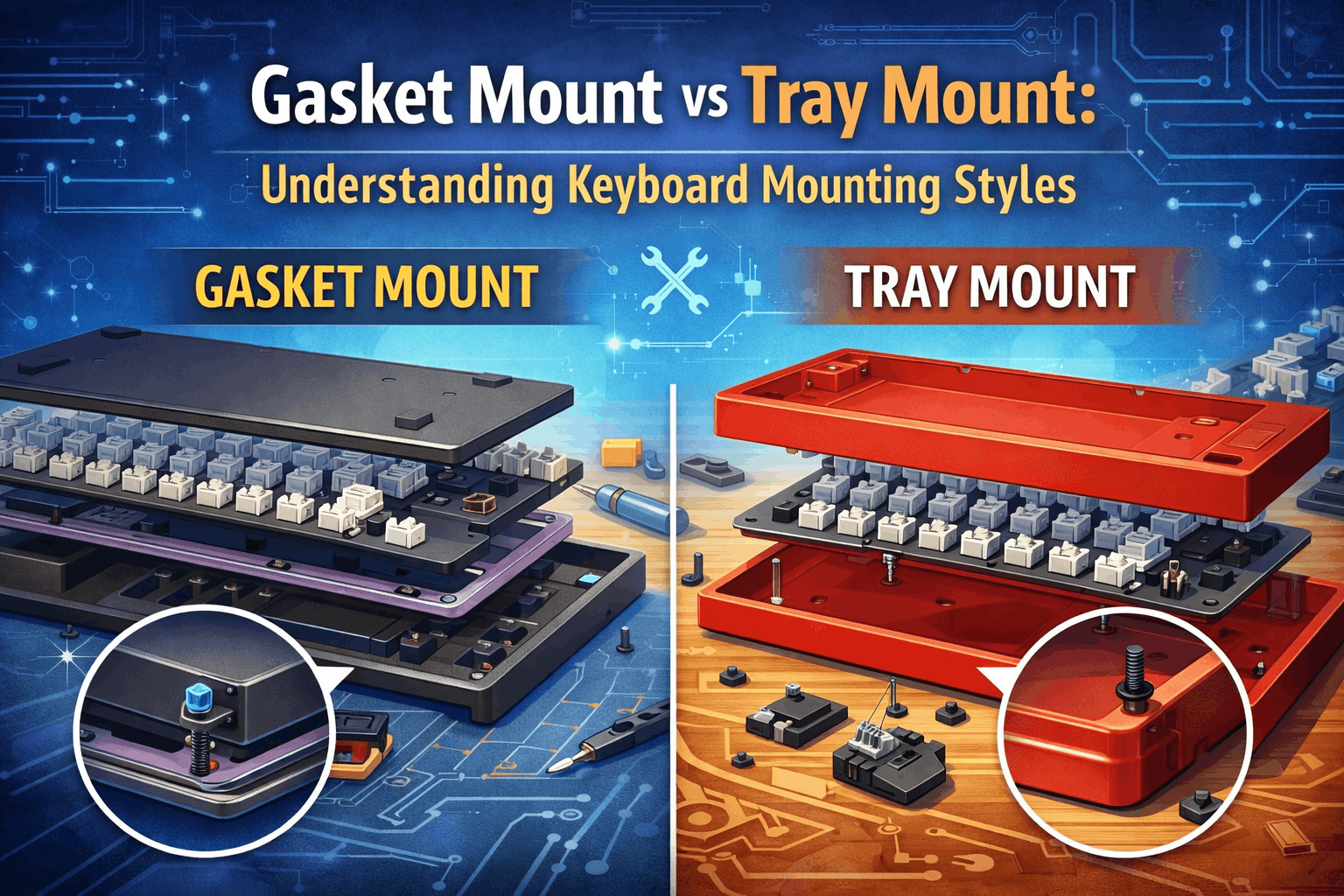
Tray mount is the simplest and most traditional mounting style. Understanding how it works is straightforward: the PCB and plate are screwed directly to metal standoffs molded into the bottom of the keyboard case.
How Tray Mount Works
Picture the bottom of a keyboard case. You'll find 5–10 small metal posts (standoffs) positioned across the interior. The PCB and plate sandwich sits on top of these posts, and screws pass through the PCB into each standoff, locking everything rigidly in place. There's nothing between the PCB and the case—they're in direct contact at every mounting point.
This design has been used for decades because it's simple to manufacture, extremely reliable, and proven to work across countless keyboard generations. You'll find it in most budget keyboards under $80, many office keyboards, and even some gaming boards.
Advantages of Tray Mount
Cost-effective
Tray mount requires no specialized materials, complex assembly, or precision engineering. Manufacturing costs are minimal, which is why tray mount keyboards are consistently cheaper than gasket alternatives.
Sturdy and reliable
Direct screw connections have proven durability over 40+ years of keyboard manufacturing. There's no guesswork about whether the mounting system will fail—millions of tray mount keyboards are still in use today.
My Keychron C1 has survived two coffee spills (after drying out), hundreds of hours of FPS gaming, and me rage-pounding keys during Valorant losses. Still works perfectly. Tray mount is bulletproof.
Easy to assemble and repair
If something breaks, tray mount keyboards are straightforward to disassemble and fix. Replacing a stabilizer or switch is simple because you just unscrew and swap components.
Consistent across units
Every tray mount keyboard manufactured performs identically. There's no variation in typing feel between units because the connection method is always the same.
No break-in period
Unlike gasket mounts, which require 2–3 weeks for gasket materials to settle and compress, tray mount keyboards feel the same on day one as they will after months of use.
Disadvantages of Tray Mount
Rigid typing feel
The direct screw connection means the PCB has minimal flex. When you press a key, you're essentially pressing against the entire keyboard case. There's no give or cushioning—for some users, this feels harsh or tiring over long sessions.
Uneven typing feel
Here's the critical limitation of tray mount: keys located directly above screw points feel noticeably harder to press than keys between mounting points. If there are five screws around the keyboard, you'll experience five "pressure points" where the keyboard feels stiffer. This inconsistency is the main reason enthusiasts prefer alternatives.
On my C1, the Tab key and right Shift both sit near screw points. They feel like typing on concrete compared to the spacebar, which sits between screws and has noticeable flex. Once you feel this difference, you can't unfeel it.
Can sound hollow or pingy
The rigid connections can amplify certain frequencies, sometimes producing a hollow or metallic "ping" sound that many typists find unpleasant. This varies by case material and internal foam, but tray mount acoustics typically need careful tuning to sound good.
Minor PCB stress
While not a failure mode in normal use, the concentrated pressure at screw points does create localized stress on the PCB. Most users will never experience issues, but over many years of heavy typing, this can theoretically contribute to connection degradation.
Best Use Cases for Tray Mount
- Budget keyboards ($30–$80): You need minimal cost and tray mount delivers affordably.
- First mechanical keyboard: If you're new to mechanical keyboards and want to test the waters without big investment, tray mount is fine to learn on.
- Gaming: The firm, rigid feel suits gaming because response time is immediate. Some gamers actually prefer the stiffness.
- Office/productivity use: For document writing and coding, the firmness is acceptable and the low cost is appealing.
- Simplicity preference: If you want a keyboard that works and doesn't require customization or tuning, tray mount is proven and simple.
Common Keyboards Using Tray Mount
- Royal Kludge RK series (budget workhorses)
- Redragon K series (especially lower-end models)
- Keychron C series (wired, budget-friendly alternatives)
- Corsair K70 and older Corsair models
- Most keyboards under $60
Gasket Mount Keyboards Explained
Gasket mount is a fundamentally different approach. Instead of rigidly screwing the PCB to the case, gasket mounting uses layers of compressible material—typically silicone or Poron foam—to suspend the PCB and plate between the case layers. The PCB essentially "floats" on these gaskets, held in place by their elasticity rather than screws.
How Gasket Mount Works
Imagine placing your PCB on a soft silicone pad at the top of the case, and another silicone pad at the bottom. The case clips or latches together around the PCB, and the gaskets compress slightly under the weight, suspending the PCB in mid-air rather than letting it rest directly on the case walls. When you press a key, the gaskets absorb the downward force, compressing slightly and then rebounding.
This creates what enthusiasts call a "floating" feeling—the PCB moves independently of the case, isolated by the gasket material. The gaskets act like a shock absorber system in a car: they absorb impact, dampen vibrations, and distribute pressure evenly across the entire keyboard.
Gasket Materials
Different gasket materials produce different typing feels:
Silicone gaskets (most common in production keyboards)
Very soft, provide maximum cushioning and flex. They compress easily but last 5–10+ years with regular use. Best for maximum comfort and flex feel.
Poron foam gaskets (premium custom builds)
More structured than silicone, offer a middle ground between cushioning and firmness. Excellent vibration dampening and often preferred by enthusiasts for their refined feel. Also durable for 5–10+ years.
Rubber gaskets (budget gasket option)
Less cushioning than silicone or Poron, but still offer meaningful isolation. More affordable to produce. Still substantially better than tray mount but with slightly firmer feel.
Advantages of Gasket Mount
Superior typing comfort
The gasket suspension absorbs the force of each keystroke, creating a softer, more forgiving feel. Your fingers and wrists experience less impact, which reduces fatigue during long typing sessions. Research shows 72% of users prefer the gasket mount feel when directly comparing keyboards.
After switching to my Q1 for writing, I noticed I could type for 6+ hours without wrist soreness. On my tray mount board, I'd feel it after 3-4 hours. The difference is real.
Consistent typing feel across the entire board
Unlike tray mount, where keys near screws feel harder, gasket mount provides a uniform feeling everywhere. Press any key and the experience is identical.
Deeper, more pleasant sound
Gasket mounting produces a 20–30% reduction in case resonance compared to tray mount keyboards. The result is a warm, muted "thock" sound in the 200–800 Hz frequency range, rather than the sharper "clack" and bright high-frequency content of tray mount boards.
Better for extended typing
The cushioning effect reduces typing fatigue, making gasket mount keyboards excellent for writers, programmers, and anyone who types for hours at a time.
Shock absorption and vibration isolation
The gaskets effectively dampen the vibrations that travel through the keyboard structure, making the overall experience feel more refined and isolated from the desk surface.
Reduced stress on PCB
Because pressure is distributed evenly across the gaskets rather than concentrated at screw points, there's less localized stress on the PCB. In theory, this improves long-term durability.
Disadvantages of Gasket Mount
Higher upfront cost
Gasket mount keyboards are typically $20–50 more expensive than equivalent tray mount models because they require specialized gasket materials and more complex assembly. A premium gasket mount can cost $100–300+, while tray mount alternatives cost $30–100.
Slight inconsistency between units
Because gasket compression varies slightly based on how the gaskets are cut, installed, and seated, there's slightly more variance between units than with tray mount. Two gasket mount keyboards from the same model might feel marginally different from each other. This is still minor compared to the variation within a single tray mount keyboard (due to the pressure-point issue).
Break-in period required
Gasket mount keyboards need 2–3 weeks for the gasket materials to settle and compress to their final state. The typing feel will shift subtly during this period. Some users find this frustrating; others see it as the keyboard "opening up" over time.
When I first got my Q1, the spacebar felt stiff and the overall bounce was minimal. After two weeks of daily use, the gaskets compressed and the keyboard transformed. It went from "nice" to "this is my favorite keyboard ever."
Can feel mushy if over-dampened
If the gaskets are too soft or too thick, the keyboard can feel excessively squishy or mushy, with too much flex and bounce. Finding the right gasket tuning is part of the appeal for enthusiasts but can be annoying for users who just want consistent feel.
More complex to repair
Because gasket mounting requires disassembling the case and managing gasket material, repairs are more involved than with tray mount. If you need to replace a stabilizer or diagnose an issue, you'll need to carefully remove and reinstall the gaskets.
Gaskets may eventually compress permanently
High-quality gaskets last 5–10+ years, but they can compress over time with heavy use. While they remain functional, some users report a subtle change in feel after several years. Gaskets are replaceable, but this is an additional maintenance task tray mount keyboards don't require.
Best Use Cases for Gasket Mount
- Typing-focused work: If you spend 6+ hours per day typing, the comfort and reduced fatigue justify the higher cost.
- Sound preference: You want the deep, muted "thock" sound rather than sharper "clack" keyboards produce.
- Premium feel: You value a refined, cushioned typing experience and are willing to pay for it.
- Enthusiast customization: You want to tune gasket compression and experiment with different gasket materials.
- Long-term investment: You plan to keep the keyboard for years and want the best possible typing experience.
Common Keyboards Using Gasket Mount
- Keychron Q series (excellent value gasket mount)
- Keychron Q1 Max (premium gasket mount)
- Glorious GMMK Pro and GMMK 2 (modular gasket design)
- Mode Keyboards (high-end custom)
- QK65, Zoom65 (popular custom builds)
- Most keyboards priced $100+ in 2026
Direct Comparison: Gasket Mount vs Tray Mount
| Feature | Gasket Mount | Tray Mount |
|---|---|---|
| Typing Feel | Soft, bouncy, cushioned, flexible | Firm, rigid, consistent, direct |
| Sound Profile | Deep "thock", muted, warm bass (200-800 Hz) | Sharp "clack", bright, higher-frequency (4-6 kHz) |
| Price Range | $80–$400+ | $30–$100 |
| Feel Consistency | Uniform across board | Harder near screw points, softer between |
| Comfort (long sessions) | Excellent (less fatigue) | Good (some find tiring) |
| Gaming suitability | Good (comfort-focused) | Good (firm response) |
| Customization | High (gasket tuning) | Low (foam mods only) |
| Break-in period | 2–3 weeks | None |
| Durability | Excellent (5–10+ years) | Excellent (indefinite) |
| Sound isolation | 20–30% less case resonance | More resonance, potential ping |
| Repair difficulty | Moderate (gasket disassembly) | Easy (simple screw removal) |
| Manufacturing cost | Higher (specialized materials) | Lower (simple design) |
| Consistency between units | Slightly variable | Highly consistent |
Understanding the Key Differences
Feel Analogy
Typing on a gasket mount keyboard is like typing on a cushioned mousepad. The surface absorbs the impact and gives slightly with each press. Typing on a tray mount keyboard is like typing on a solid desk—immediate feedback, no give, responsive but potentially harsh.
Sound Science
Gasket mount's deep "thock" comes from the 200–800 Hz frequency range, where the gasket material absorbs vibrations at higher frequencies. Tray mount produces sharper sounds because vibrations at 4–6 kHz aren't damped—they ring through the case clearly. Many listeners describe gasket sound as "muted" and "satisfying," while tray mount sounds "crisp" or sometimes "hollow."
Price Justification
Gasket mounting requires 10–20% more materials and significantly more assembly complexity. Manufacturing a gasket mount keyboard demands tighter tolerances, specialized assembly equipment, and quality control. This cost difference justifies the $20–50 premium you see in the market.
Real-World Impact
For casual users typing 1–2 hours per day, the difference between gasket and tray mount is noticeable but not transformative. For someone typing 8+ hours daily (writer, programmer, journalist), the difference in comfort is substantial and worth the investment.
Look, if you're only typing emails and browsing Reddit, tray mount is fine. But if you're writing code for 8 hours or drafting articles like I do, gasket mount isn't a luxury - it's an ergonomic necessity.
Other Mounting Styles: Brief Overview
While gasket mount and tray mount are the most common, several alternative mounting methods exist. Understanding these helps you spot them in product descriptions and know what you're getting.
Top Mount
The plate screws to the top half of the case instead of the bottom. This isolates the typing mechanism from the lower case half, creating a more consistent feel than tray mount. Top mount feels moderately soft—softer than tray, firmer than gasket. It's commonly used in custom keyboard group buys and some premium pre-built keyboards.
Bottom Mount
The opposite of top mount: the plate screws to the bottom case. This creates a very firm typing feel because the plate sits lower in the case, closer to the desk surface. The sound profile is deeper but rigid. Bottom mount is uncommon in modern keyboards.
Burger Mount / Sandwich Mount
The plate is sandwiched between the top and bottom case using screws that go through both layers. Think of it like a hamburger: bun (bottom case), patty (plate), bun (top case). This creates a very rigid structure with excellent stability—ideal for competitive gaming keyboards where responsiveness matters.
Integrated / Plateless Mount
Instead of a separate plate, switches mount directly to the PCB. This allows maximum flex and responsiveness. The PCB itself acts as the mounting surface. It's most common in ultra-premium custom keyboards because it's expensive and requires precision-engineered PCBs.
Spring Mount (Rare)
Rather than gaskets or screws, springs support the PCB and plate. This is an experimental design used by only a handful of ultra-premium custom boards. It offers extreme flex and bounce but is complex, expensive, and rarely seen in mainstream keyboards.
Comparison Table: All Major Mounting Styles
| Mounting Style | Feel | Sound | Price | Customization | Best For |
|---|---|---|---|---|---|
| Tray Mount | Firm, uneven | Sharp, bright, can ping | Budget ($30-100) | Low | Beginners, gaming, budget buyers |
| Gasket Mount | Soft, uniform, bouncy | Deep thock, muted | Mid-High ($80-400) | High | Comfort, typing, enthusiasts |
| Top Mount | Balanced, semi-soft | Crisp, clear, good thock | Mid ($100-200) | Medium | Custom builds, balance seekers |
| Bottom Mount | Rigid, stable | Deep, firm | Rare/Specialty | Low | Specialized builds |
| Sandwich/Burger | Very rigid, firm | Bright, stable | Mid-High ($120-250) | Very Low | Gaming, stability priority |
| Integrated/Plateless | Ultra-soft, maximum flex | Unique, experimental | Premium ($300+) | Very High | Enthusiasts, premium builds |
Which Mounting Style Should You Choose?
Use this decision framework to identify which matters for your situation:
If Your Budget Is Under $75
→ Tray mount is your only realistic option. Gasket mount keyboards simply aren't manufactured below this price point. The good news: tray mount works fine for most users. You'll get a functional, durable keyboard. The typing feel will be firm and may have slight pressure-point issues, but millions of people use tray mount keyboards daily without complaint.
Recommendation: Royal Kludge RK84 or Keychron C series. Both offer good quality at tray mount price points with hot-swappable switches so you can customize your typing experience through switch choice rather than mounting style.
If Your Budget Is $75–$150
→ Ask yourself: Do I prioritize comfort or cost savings?
YES, I want the best typing feel: → Choose gasket mount. At this price point, gasket mount keyboards like the Keychron V1/V3 or Glorious GMMK 2 offer exceptional value. You'll notice the comfort difference immediately, especially if you type more than 3 hours daily.
NO, I want to save money: → High-quality tray mount. Keyboards like the Keychron C series or Royal Kludge RK84 offer solid build quality at lower cost. You'll miss the premium feel but save $30–50.
If Your Budget Is $150+
→ Gasket mount is strongly recommended. At this price point, virtually all mainstream keyboards use gasket mounting anyway. The Keychron Q1 Max, Glorious GMMK Pro, or Asus ROG Azoth all feature gasket mounting and deliver genuine premium typing experiences.
Additional Considerations
Noise Level
If you need a quiet keyboard, gasket mount is superior because the 20–30% reduction in case resonance means noticeably less sound. Tray mount keyboards often sound sharper and more hollow, which some find louder even at the same decibel level.
Gaming Focus
Tray mount is acceptable for gaming—response time is determined by switch mechanics, not mounting style. The firm feel of tray mount doesn't hurt gaming performance. However, many new gaming keyboards from Razer, Corsair, and ASUS are switching to gasket mounting for comfort during long gaming sessions.
Office/Productivity
Either works fine. Tray mount is more budget-friendly; gasket mount is more comfortable for all-day typing. If you'll keep the keyboard for 5+ years, gasket mounting's durability advantage and fatigue reduction justify the extra cost.
First Mechanical Keyboard
Either is a safe choice. Tray mount lets you learn keyboard concepts affordably. Gasket mount provides a more refined experience from day one. If you're confident you'll stick with mechanical keyboards, gasket mount is worth the premium.
How to Identify Mounting Style Before Buying
Most product descriptions don't explicitly state "this keyboard uses tray mount," so here's how to identify the mounting style:
Check the product specifications. Most keyboard manufacturers now list the mounting style in the technical specs or marketing highlights. Look for terms like "gasket mount," "tray mount," "top mount," or "mounting style."
Price is a strong indicator. Keyboards under $75 are almost always tray mount. Keyboards $100+ are increasingly gasket mount. This correlation holds true for 95% of keyboards on the market.
Read reviews and look for feel descriptions. If reviewers mention "soft typing," "bouncy," or "deep thock," it's likely gasket mount. If they mention "firm," "responsive," or "rigid," it's likely tray mount.
Watch YouTube sound tests. Search "[keyboard model] sound test" on YouTube. Gasket mount keyboards produce noticeably deeper, muted sounds. Tray mount keyboards produce brighter, sharper sounds. Even if you can't hear perfectly through your speakers, the difference is obvious.
Check community resources. Reddit's r/MechanicalKeyboards and Geekhack forums have detailed discussions about nearly every keyboard. Someone has posted about the mounting style and typing feel.
Examine disassembly videos. If the keyboard has been reviewed professionally or by content creators, someone usually posts a disassembly video showing the internal mounting structure. This definitively answers the question.
Red flags for misleading marketing: Avoid language like "gasket-like feel" or "flex cut tray mount." These are marketing terms for tray mount keyboards trying to sound more premium. Only actual gasket mounting (with silicone/foam gaskets between plate and case) counts as true gasket mounting.
Sound and Feel: Science Behind the Experience
The physical differences between mounting styles create measurable acoustic and tactile differences.
The Physics of Feel
When you press a key, you're exerting approximately 0.5–2 newtons of force, depending on the switch. In a tray mount keyboard, this force travels directly through rigid metal and plastic, creating firm resistance at screw points and slight flex between them. The pressure points near screws create hardness variations across the board.
In a gasket mount keyboard, this same force presses down on elastic gasket material. The gaskets compress slightly, absorbing the force gradually. The plate descends in a smooth curve rather than rigid resistance. Your finger experiences a softer deceleration, which feels more forgiving and cushioned.
The fatigue factor
Over 6–8 hours of typing, the accumulated impact of thousands of keystrokes adds up. Tray mount keyboards concentrate pressure at screw points, creating repetitive stress in certain areas of your hand and wrist. Gasket mount keyboards distribute pressure evenly, reducing this cumulative stress. This is why professional typists often prefer gasket mounting—it's not just more comfortable moment-to-moment; it's measurably less fatiguing over extended sessions.
The Physics of Sound
Sound is vibration traveling through materials. When you press a key on a tray mount keyboard, vibrations from the switch and keypress travel through the plate, then directly into the rigid case structure, where they ring and amplify. These vibrations travel efficiently because metal and plastic are rigid conductors. The result is clear, bright sound with noticeable resonance.
In a gasket mount keyboard, those same vibrations travel through the gasket material, which absorbs and dampens them. The softer material breaks the transmission of vibration—much like how foam dampening in a car reduces road noise. The vibrations that make it through the gasket are attenuated, particularly in the high-frequency ranges (3–6 kHz) that our ears perceive as sharp or piercing.
This is why gasket mount keyboards sound like a deep "thock"—the low frequencies (bass) still come through because they're harder to dampen, but the high frequencies that would make the sound "bright" or "pingy" are filtered out.
The frequency breakdown
- Tray mount: Peaks at 4–6 kHz (sharp, bright), longer decay (ring), overall louder
- Gasket mount: Peaks at 200–800 Hz (warm, deep), shorter decay, overall quieter, emphasized bass
Neither is objectively better—they're different acoustic signatures. Many people find gasket sound more satisfying; others prefer the responsiveness of tray mount sound. This comes down to personal preference.
FAQ: Common Questions About Mounting Styles
Is gasket mount always better than tray mount?
No. "Better" depends entirely on your priorities. Gasket mount offers superior comfort, sound, and consistency, but tray mount is cheaper, proven, and completely adequate for many users. If you type casually 1–2 hours daily and prioritize budget, tray mount is sensible. If you type 8+ hours daily, gasket mount's comfort becomes valuable. Both are legitimate choices for different situations.
Can you modify a tray mount keyboard to gasket mount?
Not practically. Converting requires redesigning the case internals, sourcing custom gasket material, and careful assembly—essentially building a new keyboard. It's cheaper to buy a gasket mount keyboard from scratch. However, you can improve tray mount feel with foam mods: adding foam between the PCB and case, or placing O-rings under the plate to reduce screw-point pressure. These mods don't replicate true gasket mounting but do improve comfort noticeably.
Do gasket mounts wear out over time?
Gasket materials can compress permanently with heavy use over many years, but high-quality silicone and Poron gaskets last 5–10+ years for typical users. After this time, you might notice a subtle change in feel—the keyboard might feel slightly firmer as gaskets lose elasticity. Gaskets are replaceable if this bothers you, though many users never notice the degradation. Tray mount keyboards have no equivalent wear mechanism; they feel identical after 10 years as they did on day one.
Why don't more gaming keyboards use gasket mount?
Historically, gaming prioritized response time and firmness over comfort. Competitive gamers preferred the direct, immediate feedback of tray mount keyboards. This is changing rapidly—newer gaming boards from Corsair, Razer, and ASUS increasingly feature gasket mounting for comfort during long sessions. The reality is that mounting style doesn't meaningfully affect gaming response time (switch mechanics and debounce timing matter far more), so the industry is adopting gasket mounting for the comfort benefits.
Is the sound difference really noticeable?
Yes, but it's subjective. If you place a gasket mount and tray mount keyboard side by side and type on both, the sound difference is obvious to most listeners. Gasket sound is noticeably deeper and more muted. Combined with the right switches and keycaps, the difference becomes dramatic. However, if you've never heard a quality gasket mount keyboard, you might not notice what you're "missing" with a tray mount board—you can't miss what you haven't experienced.
Which mounting style is best for long typing sessions?
Gasket mount, by a significant margin. The cushioning effect reduces impact, distributes pressure evenly, and minimizes vibration transfer to your hands and wrists. If you spend 6+ hours daily typing, the comfort difference adds up. Research from MechaBoard (2024) found 72% of users preferred gasket mount feel when directly comparing keyboards, especially noting reduced fatigue during extended sessions.
Can you mix mounting styles in one keyboard?
No, not in the traditional sense. The mounting style is determined by the keyboard's internal case design—you can't mechanically combine tray mount and gasket mount on the same board. However, some modern keyboards offer "hybrid" approaches that combine gasket mounting with elements of top mount, creating a middle ground between pure gasket and pure top mount.
What if I hate the gasket mount feel?
If you find gasket mounting too soft or bouncy, you have options: (1) Experiment with different gasket materials—Poron gaskets feel firmer than silicone; (2) Tighten the gasket compression by adjusting mounting points if your keyboard allows it; (3) Accept that you prefer firm keyboards and use tray mount instead. Personal preference is valid—not everyone loves gasket mounting, and that's okay. Try before you buy if possible (visit keyboard meetups, try friend's keyboards).
Conclusion: Making Your Choice
Mounting style is one variable among many that determine your typing experience. The quality of your switches, the keycap material, the case construction, and your personal preferences all matter significantly. But mounting style is foundational—it shapes everything that comes after.
If you're building your first mechanical keyboard, understand that you can't go wrong with either approach. A well-designed tray mount keyboard in the $50–80 range will serve you well and teach you keyboard fundamentals. A gasket mount keyboard in the $100–150 range offers a noticeably more refined experience and will likely last you years without upgrades.
The real question isn't "which is objectively better?" but "which aligns with my priorities?" If you prioritize comfort and refinement and you'll keep the keyboard long-term, gasket mount is worth the investment. If you want maximum value on a budget or prefer firm feedback, tray mount is completely legitimate.
You now understand what separates these two approaches. You can read product descriptions and immediately identify the mounting style. You can predict how a keyboard will feel and sound based on its mounting structure. This knowledge removes mystery from keyboard specifications and lets you make confident buying decisions.
The mechanical keyboard market is increasingly moving toward gasket mounting as manufacturing scales and costs decrease. By 2026, you'll find affordable gasket mount options alongside premium ones. Both mounting styles will continue coexisting because both serve legitimate needs. Understanding the difference gives you the tools to choose the right keyboard for your hands, your ears, and your budget.
Ready to put this knowledge to practice? Check our guide to hot-swappable keyboards to understand how switch mounting complements case mounting, then explore our keyboard switches guide to learn how different switches interact with mounting styles. Our keyboard cases guide also covers case materials and construction types in detail.