Mechanical keyboards revolutionize computer interaction through superior tactile feedback, customizable typing experiences, exceptional durability, and personalization possibilities impossible with standard membrane keyboards. Understanding mechanical keyboard fundamentals—from switch technologies to customization options—empowers informed purchasing decisions and optimal typing experience matching individual needs, preferences, and budgets.
This comprehensive ultimate guide synthesizes mechanical keyboard knowledge providing complete resource for beginners through enthusiasts: switch types and selection matching typing style, keyboard sizes and layouts optimizing desk space and workflow, leading brands and their positioning, sound and feel customization through modifications, buying guidance across budget tiers, maintenance and longevity optimization, and future-proofing considerations ensuring lasting satisfaction.
Whether discovering mechanical keyboards for first time, upgrading from membrane keyboard, exploring enthusiast customization, or researching optimal keyboard for specific use case (gaming, programming, writing, office work), this ultimate guide provides foundation through advanced knowledge enabling confident decisions in mechanical keyboard journey.
Mechanical keyboards represent investment in primary computer interface used thousands of times daily. Understanding options, trade-offs, and personal preference factors ensures investment delivers satisfaction, productivity, and enjoyment for years. This guide distills knowledge from extensive mechanical keyboard ecosystem into actionable framework for successful keyboard selection and optimization.
Note: This guide contains affiliate links. If you purchase through our links, we may earn a commission at no extra cost to you. This helps support our testing and content creation.
Why Mechanical Keyboards Matter
Superior Typing Experience
Tactile Feedback Distinction:
Mechanical switches provide distinct physical feedback confirming keypress registration. Membrane keyboards produce mushy unclear feel without clear actuation point. Mechanical keyboards offer precise tactile clarity with every keystroke.
Consistency Over Time:
Each keypress on mechanical keyboard feels identical. Membrane keyboards degrade gradually becoming inconsistent as rubber domes age. Mechanical switches maintain exact same feel over millions of actuations.
Reduced Finger Fatigue:
Precise actuation points on mechanical switches reduce required force. Membrane keyboards require full press bottoming out. Mechanical switches actuate before full depression reducing finger impact stress. Extended typing sessions noticeably less fatiguing.
Typing Speed Improvement:
Many users naturally type faster on mechanical keyboards. Clear tactile feedback provides confidence enabling rapid typing without looking. Visual confirmation less necessary with mechanical feedback.
Sound Satisfaction:
Mechanical keyboards produce satisfying acoustic signature. Feedback is auditory and tactile. Membrane keyboards silent but less satisfying. Mechanical keyboard sounds improve typing enjoyment.
Exceptional Durability
Extreme Longevity:
Quality mechanical switches rated 50-100 million actuations. Typical membrane keyboard lifespan: 5-10 million actuations. Mechanical keyboards last 5-10x longer than membrane.
Cost per Year Analysis:
A quality mechanical keyboard lasting 10 years costs very little per year for primary daily tool. A cheap membrane keyboard lasting 2 years costs about the same per year. Similar annual cost, vastly superior experience. Long-term value exceptional.
Repairability and Serviceability:
Mechanical keyboards easily serviceable. Replace individual switches, keycaps, stabilizers, even PCB if needed. Membrane keyboards disposable—cannot repair economically.
Environmental Impact:
One mechanical keyboard lasting 10 years versus five membrane keyboards over same period. Significantly less electronic waste. Better environmental footprint.
Reliability:
Mechanical switches proven 50+ years of reliability history. Cherry MX switches manufactured continuously since 1985. Proven dependability.
Customization and Personalization
Switch Selection Possibilities:
Choose from linear, tactile, clicky, and silent switch categories. Weight options span 35g ultra-light through 100g+ heavy. Customize each individual key if desired. Express typing preference exactly.
Keycap Customization:
Unlimited color combinations, material choices (PBT superior, ABS budget), profile options (Cherry, SA, DSA, XDA), and legend styles (doubleshot, dye-sub, laser). Express personality through keycaps.
Sound Tuning Customization:
Modifications create desired acoustic signature. Deep satisfying thock, crisp bright clack, silent operation—all achievable. Dial in exact sound preference.
Layout Options Variety:
Choose from 40% ultra-compact through full-size with numpad. Ergonomic split options available. Find exact size matching workflow and desk space.
Programmability and Layers:
QMK/VIA firmware enables layers, macros, custom behaviors. Optimize keyboard per specific task or application. One physical keyboard becomes multiple logical keyboards.
Productivity Benefits
Faster Typing Velocity:
Precise feedback enables confident rapid typing. Reduce typos through clear actuation points.
Fewer Errors:
Clear distinct actuation reduces accidental presses and missed keys.
Reduced Repetitive Strain Injury:
Better ergonomics and lighter actuation reduce hand strain. Mechanical keyboards healthier for long-term use.
Enjoyment Engagement:
Satisfying typing experience increases engagement with work. Enjoyable tool increases motivation and reduces task fatigue.
Professional Appearance:
Premium keyboard conveys attention to quality tools and craftsmanship.
Gaming-Specific Advantages
Rapid Response Time:
Mechanical switches register keypresses quickly (~2ms) versus membrane (~10-20ms). Critical advantage in competitive gaming.
N-Key Rollover:
Press all keys simultaneously—all register correctly. Membrane keyboards sometimes miss simultaneous presses. Mechanical keyboards perfect for complex key combinations.
Durability Under Intense Use:
Withstands aggressive gaming sessions, rapid repeated presses, years of heavy use without degradation.
Customization for Games:
Program game-specific macros, set per-key RGB lighting, optimize layout per game. Custom keyboard per game possible.
Understanding Mechanical Switches
The Three Main Categories
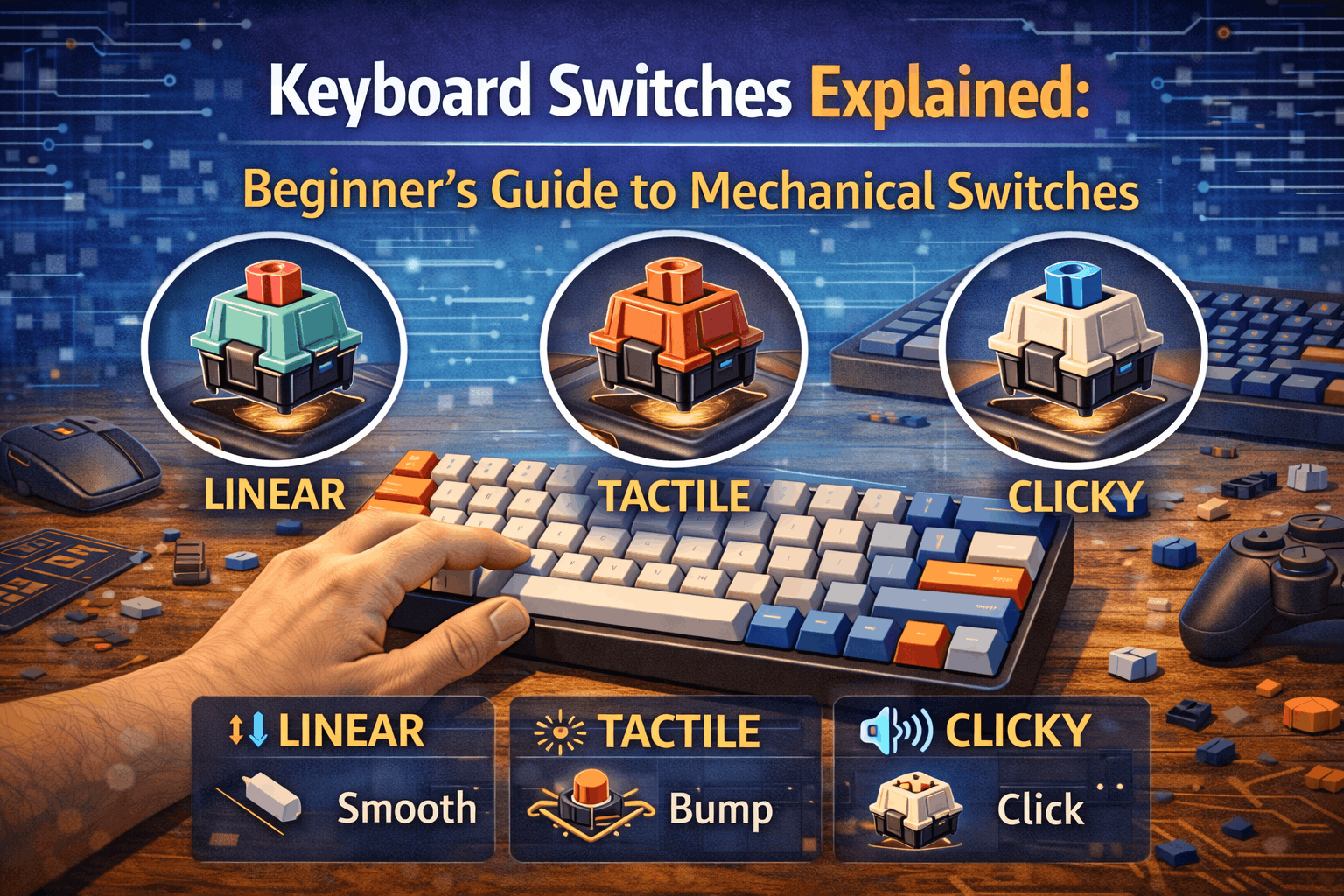
Linear Switches (Smooth Travel)
Typing Feel: Smooth consistent travel without tactile bump. Straight down path, straight up return. No resistance during travel.
Sound Profile: Quiet to moderate depending on housing material. No click mechanism. Dampening material reduces acoustic signature.
Best Applications: Gaming requiring fastest response, users preferring smooth feel, office environments requiring quiet.
Popular Linear Examples:
- Cherry MX Red
- Gateron Yellow
- Gateron Ink Black
Actuation Force Range: 35g to 70g typical
Who Should Choose Linear Switches: Gamers, smooth typing enthusiasts, office workers needing quiet operation.
Tactile Switches (Bump Without Click)
Typing Feel: Noticeable bump during travel indicating actuation point. Provides mechanical feedback without audible sound. Bump creates subtle resistance.
Sound Profile: Moderate volume. Bump creates subtle acoustic signature but no dedicated click mechanism.
Best Applications: Typing and productivity, programming, balanced general use, those wanting feedback without excess noise.
Popular Tactile Examples:
- Cherry MX Brown
- Boba U4T
- Durock T1
Actuation Force Range: 45g to 70g typical
Who Should Choose Tactile Switches: Typists, programmers, general users wanting feedback, balanced preference users, first-time mechanical keyboard buyers.
Clicky Switches (Bump Plus Click)
Typing Feel: Tactile bump during travel PLUS audible click mechanism. Maximum feedback both tactile and auditory.
Sound Profile: Loud distinctive click sound. Satisfying but potentially disruptive to others. Unmistakable acoustic signature.
Best Applications: Personal spaces allowing noise, typing enthusiasts loving extreme feedback, those not concerned about disturbing others.
Popular Clicky Examples:
- Cherry MX Blue
- Kailh Box White
- Kailh Box Jade
Actuation Force Range: 50g to 80g typical
Who Should Choose Clicky Switches: Enthusiasts, personal office setups, typists loving audible feedback, those enjoying mechanical satisfaction.
Silent Switches (Special Category)
Design: Built-in dampening pads on stem and housing. Reduces both bottom-out and top-out noise. Mechanical feedback preserved despite silence.
Sound Profile: Significantly quieter than standard switches. Nearly silent operation. Perfect for shared spaces.
Typing Feel: Slightly softer bottom-out due to dampening pads. Mechanical feedback still present.
Best Applications: Shared office spaces, open offices, libraries, studios, late-night typing, considerate neighbors.
Popular Silent Examples:
- Cherry MX Silent Red
- Boba U4 Silent
- Gateron Silent
Who Should Choose Silent Switches: Office workers, shared living spaces, those requiring minimal noise, recording studios, thoughtful neighbors.
Switch Selection Decision Framework
Evaluate Your Situation:
- Environment consideration: Shared space (silent or tactile) or private space (any)?
- Primary use case: Gaming (linear) or typing (tactile) or mixed (tactile)?
- Sound preference: Quiet (silent), moderate (linear/tactile), loud (clicky)?
- Tactile preference: No bump (linear), subtle bump (tactile), maximum (clicky)?
- Actuation weight: Light (<50g) reducing fatigue, medium (50-65g), heavy (70g+)?
First-Time Buyer Recommendation:
Tactile switches (Cherry MX Brown or Gateron Brown) represent excellent all-around choice. Satisfying feedback without excessive noise. Good for everything—gaming, typing, mixed use. Safe proven choice.
Switch Quality Tiers
Budget Tier ($0.15-0.30 per switch):
- Outemu, basic Gateron variants
- Adequate functionality
- Slightly scratchier feel
- Acceptable for entry keyboards
Mid-Range Tier ($0.30-0.50 per switch):
- Cherry MX, Gateron Pro, Akko switches
- Good quality, proven reliability
- Smooth operation
- Professional recommendation
Premium Tier ($0.50-0.80 per switch):
- Gateron Ink, Durock, Boba, JWK recolors
- Exceptionally smooth operation
- Superior build consistency
- Worthwhile investment for primary keyboard
Quality Importance:
Quality switches noticeably smoother, produce better sound, maintain consistency longer. Premium switches worth investment for keyboards used daily for years.
Keyboard Sizes and Layouts
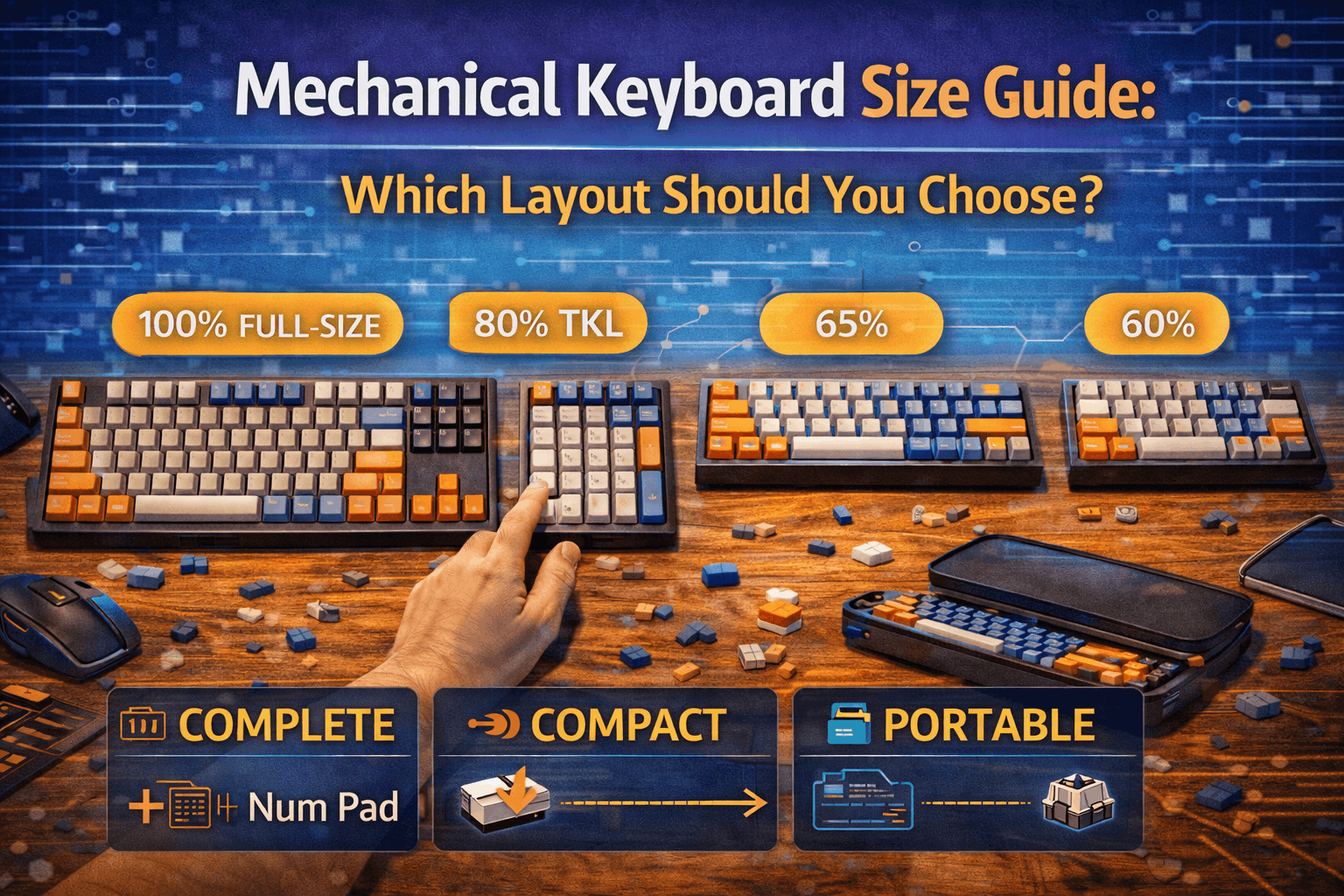
Full-Size (100% Layout - 104+ Keys)
Keyboard Composition:
- All standard keys
- Complete numpad
- Full navigation cluster
Dimensions: Approximately 17.5 inches wide × 6.5 inches deep
Best Applications: Accountants, data entry professionals, spreadsheet users, those using numpad frequently in workflow.
Drawbacks: Large desk footprint reduces mouse space. Mouse positioned farther away (ergonomics concern).
Popular Full-Size Examples: Das Keyboard 4, Leopold FC980M (compact full-size), Keychron Q6
First-Time Buyer Consideration: Only if numpad essential for workflow.
TKL - Tenkeyless (80% Layout - 87 Keys)
Keyboard Composition:
- All keys except numpad
- Complete function row (F1-F12)
- Full navigation cluster (arrows, home, end, etc.)
Dimensions: Approximately 14 inches wide × 5.5 inches deep
Best Applications: Most general users, gamers (mouse closer), professionals, balanced functionality-to-size ratio.
Positioning: Sweet spot layout. Removes rarely-used numpad while keeping essential functionality.
Popular TKL Examples: Leopold FC750R, Keychron Q3, Ducky One 2 TKL
First-Time Buyer Recommendation: Excellent choice. Familiar layout with reasonable compactness.
75% Layout (84 Keys)
Keyboard Composition:
- Function row present
- Arrows and navigation present
- No spacing between key sections (compact arrangement)
Dimensions: Approximately 12.5 inches wide × 5 inches deep
Best Applications: Compact enthusiasts, travelers, small desks, space optimization.
Key Advantage: Most functionality in smallest practical package without extreme layer usage.
Learning Curve: Minimal—familiar to TKL users.
Popular 75% Examples: Keychron Q1, GMMK Pro, Mode Eighty
First-Time Buyer Consideration: Good compromise between compactness and functionality.
65% Layout (68 Keys)
Keyboard Composition:
- No function row
- Dedicated arrow keys
- Reduced navigation cluster
Dimensions: Approximately 12 inches wide × 4.5 inches deep
Best Applications: Compact preference, aesthetic appeal, function row not regularly used.
Compromise: Some keys require layer access (F-keys accessible via Fn+number).
Popular 65% Examples: Tofu65, KBD67, Keychron Q2
First-Time Buyer Consideration: Compact with minor learning curve.
60% Layout (61 Keys)
Keyboard Composition:
- Alphas and modifier keys only
- No dedicated arrows
- No function row
- No navigation cluster
Dimensions: Approximately 11.5 inches wide × 4 inches deep
Best Applications: Minimalists, ultra-compact setups, programmers using layers extensively.
Challenge: Everything accessed via layers. Significant learning curve for transition from standard layouts.
Popular 60% Examples: Poker 3, Anne Pro 2, RK61
First-Time Buyer Consideration: Not recommended unless specific desire for minimalism and willing to learn layer system.
40% and Below (40-50 Keys)
Extreme Minimalism: Even number keys accessed via layers.
Best Applications: Enthusiasts, novelty, extreme portability, hobbyists.
Not Recommended: Beginners or general users. Too compromised for practical everyday use.
Ergonomic and Split Layouts
Alice Layout:
- Slightly angled split arrangement
- More ergonomic than standard
- Not extreme separation
- Moderate learning curve
Full Split Layouts:
- Two separate keyboard halves
- Maximum ergonomic customization
- Significant adjustment period
- Best for RSI prevention
Popular Ergonomic Examples: Keychron Q10 (Alice), Kinesis Freestyle Pro (split)
Best For: RSI prevention, ergonomic priority, typing-focused professionals.
Layout Selection Guide
Decision Tree:
Desk space unlimited + use numpad: Full-size (100%)
Desk space reasonable + don't need numpad: TKL (80%) - most popular
Small desk + want function row: 75%
Very small desk + aesthetic priority: 65%
Minimalist + willing to learn layers: 60%
First-Keyboard Recommendation: TKL or 75% layout. Familiar enough for comfortable transition, compact enough for improvement, functional enough for complete use without heavy layer dependency.
Top Keyboard Brands and Positioning
Premium Brands ($150-500+)
Leopold (Legendary Quality)
Reputation: Legendary build quality and typing experience. Single-minded focus on mechanical excellence.
Characteristics: Exceptional typing feel, conservative aesthetic, no fluff, proven reliability.
Customization: Limited (pre-built only, proprietary cases).
Best For: Those wanting best typing experience possible out-of-box. Quality absolutists.
Notable Models: FC980M, FC750R, FC900R
Keychron Q Series (Best Value Premium)
Reputation: CNC aluminum cases, QMK/VIA support, hot-swap, excellent value at premium price point.
Characteristics: Gasket mount (excellent feel), software customization, multiple layouts, build quality.
Customization: Excellent (hot-swap switches, QMK/VIA).
Best For: Custom enthusiasts, Mac users, budget-conscious premium buyers, modding enthusiasts.
Notable Models: Q1, Q2, Q3
Ducky (Reliable Quality)
Reputation: Reliable proven quality, excellent stabilizers stock, beautiful included keycaps.
Characteristics: Consistent quality, limited availability sometimes, pre-built only.
Best For: Reliable premium pre-built keyboards, aesthetic focus.
Varmilo (Aesthetic Artistry)
Reputation: Gorgeous designs and custom keycaps, excellent build quality.
Characteristics: Beautiful aesthetics, customization options, higher prices.
Best For: Aesthetic priority, unique custom designs, keycap appreciation.
Mid-Range Brands ($$)
Keychron V Series (Best Budget Value)
Reputation: Hot-swap, good features, solid build quality, excellent value mid-range.
Characteristics: Accessible entry premium, basic features sufficient, proven reliability.
Best For: First mechanical keyboard, budget enthusiasts, casual users.
Akko (Growing Quality)
Reputation: Good quality switches, cute aesthetics, growing ecosystem.
Characteristics: Value-focused, aesthetic variety, improving build quality.
Best For: Budget-conscious buyers, aesthetic variety preference, platform expansion.
Royal Kludge (Wireless Options)
Reputation: Wireless options at budget price, decent quality, hit-or-miss quality control.
Best For: Wireless budget option, portable keyboards.
Budget Brands ($)
Redragon (Ultra-Budget Entry)
Reputation: Ultra-budget entry point, adequate quality, heavy gamer aesthetic.
Characteristics: Acceptable for testing mechanical preference, good value for price.
Best For: First mechanical keyboard on tight budget, testing mechanical preferences.
Tecware (Simple and Reliable)
Reputation: Simple reliable budget, basic but functional, good starting point.
Best For: Minimalist budget option, straightforward functionality.
Enthusiast/Custom Brands ($200-1000+)
Mode, Zoom, TGR, Keycult, etc.
Reputation: Group buy limited runs, ultimate quality, collector pieces.
Characteristics: Long wait times, premium pricing, premium results.
Best For: Serious enthusiasts, collectors, those with budget unconstrained.
Gaming Brands (Consider Carefully)
Razer, Corsair, Logitech, SteelSeries
Assessment: RGB features, gaming-specific software, proprietary ecosystem.
Advantages: Gaming integration, familiar brand names.
Disadvantages: Overpriced for quality, limited switch options, non-standard layouts, inferior typing experience versus enthusiast brands.
Recommendation: Avoid gaming brands unless ecosystem integration absolutely essential. Better keyboards available for equivalent money. Prioritize typing experience over gaming aesthetics.
Customization and Modifications
Beginner-Friendly Modifications
Case Foam ($$$):
Impact: Biggest acoustic improvement. Reduces hollowness dramatically. Noticeable immediate difference especially budget keyboards.
Installation: Easy. Cut foam to case shape, place in bottom, PCB sits on top.
Time Investment: 15 minutes.
Result: Deeper fuller sound. Significantly improved keyboard character.
Recommendation: Essential modification. Best value improvement.
Tape Mod ($):
Impact: Deepens sound significantly. Reduces high-frequency harshness.
Installation: Apply 3-4 layers masking tape to PCB back. Takes 30 minutes.
Time Investment: 30 minutes.
Result: Deeper controlled sound. More refined acoustic profile.
Recommendation: Excellent value modification. Highly recommended alongside case foam.
Keycap Upgrade ($$):
Impact: Immediate aesthetic transformation. Improves feel and sound.
Installation: No tools required. Remove old keycaps, install new. 10 minutes.
Time Investment: 10 minutes.
Result: New aesthetic, improved typing feel, potentially better sound.
Recommendation: High satisfaction modification. Transforms appearance and feel.
Intermediate Modifications
Impact: Dramatically improves smoothness. Eliminates scratchiness. Improves sound.
Installation: Open switches, apply lube to stem and housing, reassemble. Time-intensive.
Time Investment: 3-4 hours full keyboard.
Tools Required: Lube, switch opener, lube station optional, brush.
Result: Butter-smooth typing, refined sound, significant typing experience improvement.
Recommendation: Major improvement justifying time investment. Worthwhile for quality keyboards.
Stabilizer Tuning:
Impact: Eliminates rattle on spacebar and large keys. Improves feel and sound.
Installation: Lube stabilizers, apply band-aid mod, balance wire. Takes 1 hour.
Time Investment: 1 hour.
Result: Professional quiet stable large key feel. Eliminates mushy spacebar.
Recommendation: Important for quality feel. Worth the effort.
Impact: Creates distinctive "poppy" sound character. Alters acoustic signature.
Installation: Place thin PE foam between PCB and switches. Requires switch removal. Moderate difficulty.
Time Investment: 1-2 hours.
Result: Distinct acoustic character. Poppy lively sound.
Recommendation: Optional acoustic tuning. For sound enthusiasts.
Advanced Modifications
Switch Filming, Spring Swapping, Frankenswitching:
Impact: Fine-tunes switch characteristics. Marginal improvements for significant effort.
Installation: Complex requiring expertise. Significant time investment.
Time Investment: 4-6 hours full keyboard.
Result: Custom switch characteristics. Diminishing returns obvious after initial improvements.
Recommendation: Hobbyist level. Pursue after mastering basic modifications. See our advanced modding guide for details.
Gasket Tuning, Weight Additions, Case Modifications:
Impact: Advanced customization. Requires disassembly, permanent changes possible.
Installation: Expert level. Requires tools and expertise.
Risk: Potential irreversible damage if mistakes made.
Recommendation: Advanced enthusiasts only. Not for beginners.
Modification Philosophy
Strategic Approach:
- Start simple: Case foam and tape mod yield 80% of improvement. Inexpensive overall, easy installation.
- Add strategically: One modification at a time. Evaluate results. Only continue if meaningful improvement.
- Know when to stop: Over-modification creates dead muted sound lacking character. Balance important.
- Modifications optional: Quality stock keyboards excellent without modifications. Customize when wanting specific improvements.
Reality Check:
Modifications improve already-good keyboard. Don't purchase poor keyboard hoping modifications fix it. Quality keyboard requires quality base.
Buying Guide by Budget
Under $100 - Entry Level
Goals: Experience mechanical keyboards. Test preferences without major investment.
Budget Breakdown:
- Keyboard: $50-90
- Keycaps: $10-20 (usually included)
- Modding supplies: $5-10
Recommended Entry Keyboards:
Keychron C1/C2 ($):
- Hot-swap design enabling switch exploration
- Basic but functional
- Good quality for price
- Popular beginner choice
Redragon K552 ($):
- Budget mechanical classic
- Proven reliability
- RGB lighting
- Adequate for testing preferences
Royal Kludge RK61 ($):
- Wireless portable option
- Budget-friendly
- Decent quality
- Good for mobile use
Expectations: Acceptable quality functioning keyboard. Will likely want upgrade eventually after understanding preferences. Good starting point without major investment.
Advice: Focus on testing preference rather than owning perfect keyboard. Upgrade informed by experience.
$100-200 - Sweet Spot Value
Goals: Quality daily driver. Long-term satisfaction. First serious purchase.
Budget Breakdown:
- Keyboard: $90-150
- Switches: $30-50 (if custom)
- Keycaps: $20-30 (if upgrading)
- Modifications: $10-20
Recommended Mid-Range Keyboards:
Keychron V Series ($$):
- Excellent value hot-swap
- QMK/VIA support
- Multiple sizes
- Outstanding build quality for price
- Best value recommendation
Keychron K8 Pro ($$):
- Wireless hot-swap
- QMK/VIA support
- Good case quality
- Excellent mid-range option
Leopold FC750R ($$):
- Legendary typing feel
- Pre-built quality stock
- Conservative aesthetic
- Excellent baseline keyboard
Akko V3 Pro ($$):
- Good quality switches included
- Pre-lubed
- Decent build
- Value-focused option
Expectations: Very good quality. Satisfying for years of use. Noticeable improvement over budget keyboards. Solid reliable choice.
Recommendation: Keychron V series best value. Leopold if wanting best typing experience immediately.
$200-350 - Premium Entry
Goals: Exceptional quality. Enthusiast entry. Premium features.
Budget Breakdown:
- Keyboard: $150-250
- Switches: $40-80 (premium options)
- Keycaps: $50-80
- Modifications: $20-40
Recommended Premium Keyboards:
Keychron Q Series ($$$):
- CNC aluminum case (premium feel)
- Gasket mount (excellent typing experience)
- Multiple layout options
- QMK/VIA support
- Best value for premium aluminum
- Strongest recommendation
GMMK Pro ($$$):
- Modular design
- Gasket mount
- Aluminum case
- Good quality components
- Slightly overpriced but solid
Ducky One 3 ($$$):
- Reliable proven quality
- Excellent stock stabilizers
- Beautiful included keycaps
- Limited customization
- Good pre-built choice
Leopold FC900R ($$$):
- Premium typing experience
- Pre-built quality
- Minimal customization
- Best stock experience
Expectations: Excellent quality. Minimal compromises. Satisfying long-term investment. Noticeably better than budget options.
Recommendation: Keychron Q series best overall. Leopold best pure typing experience.
$350-700+ - High-End Enthusiast
Goals: Ultimate quality. Enthusiast passion project. Premium exclusivity.
Budget Breakdown:
- Keyboard: $250-600
- Premium switches: $80-150
- Premium keycaps: $100-200+
- Modifications: $50-100+
Recommended High-End Keyboards:
Mode Keyboards ($$$):
- Premium gasket mount
- Beautiful design
- Limited runs
- Collector pieces
Custom Group Buy Keyboards ($300-600+):
- Limited production runs
- Premium quality
- Community-built anticipation
- Collector value
High-End Customs ($500-1000+):
- Ultimate builds
- Bespoke customization
- Investment pieces
Expectations: Diminishing returns obvious. Paying for refinement, exclusivity, craftsmanship, collector value rather than functionality.
Note: Enthusiasts appreciate subtle improvements. Casual users unlikely to notice differences from a mid-priced keyboard.
Budget Allocation Strategy
$150 Total Budget Example:
- Keyboard: Keychron V
- Switches: Gateron Yellow pre-installed
- Keycaps: budget PBT
- Modifications: case foam, tape
$300 Total Budget Example:
- Keyboard: Keychron Q3
- Switches: premium if DIY, otherwise pre-installed
- Keycaps: quality PBT
- Modifications: foam, tape, stabilizer lube
Value Optimization Philosophy:
Keychron Q series offers best quality-to-price ratio for enthusiast keyboards. Leopold best pre-built typing experience. Spend more on keyboard quality than on modifications—quality base matters most.
Maintenance and Longevity
Regular Maintenance Schedule
Weekly Maintenance:
- Compressed air quick clean removing dust
- Wipe accessible surfaces gently
- Remove visible debris
Monthly Deep Clean:
- Thorough compressed air cleaning
- Alcohol wipe keycaps (remove fingerprints)
- Gentle case exterior cleaning
Quarterly Thorough Cleaning:
- Remove all keycaps
- Deep clean keycaps individually
- Compressed air clean switch tops and PCB
- Wipe case interior
Annual Comprehensive Service:
- Full disassembly
- Deep clean all components
- Inspect for damage or wear
- Relube if needed
- Check stabilizer function
Preventing Common Issues
Food and Drinks Prevention:
- No food or drinks near keyboard (primary damage cause)
- Keep workspace clear of hazards
- Use spill-proof containers
Dust Accumulation Prevention:
- Use dust cover when not in use
- Compressed air clean regularly
- Store in clean environment
Physical Stress Prevention:
- Gentle typing (don't pound keys unnecessarily)
- Avoid dropping or heavy impacts
- Use quality desk mat providing stable surface
- Proper cable management preventing strain
Extending Keyboard Lifespan
Quality Selection Critical:
- Premium keyboards ($$$) last decades with proper care
- Budget keyboards ($) typically 5-10 years
Repairability Advantage:
- Hot-swap keyboards enable easy switch replacement
- Component replacements extend keyboard life
- Even PCBs replaceable on quality boards
Expected Lifespan Ranges:
Membrane Keyboard: 2-5 years typical
Budget Mechanical: 5-10 years with reasonable care
Quality Mechanical: 10-20+ years with maintenance
Premium Mechanical: Effectively lifetime with occasional repairs and care
Investment Perspective:
A quality mechanical keyboard over 15 years of daily use costs only a few dollars per year for primary work tool. Excellent value considering how many times daily the keyboard is used (thousands of keypresses). Sound investment.
FAQ
Q: Are mechanical keyboards really worth the investment?
A: Absolutely, for anyone typing regularly (programmers, writers, office workers, gamers). Superior tactile feel, 50-100 million actuation lifespan versus 5-10 million membrane, endless customization options. Long-term value exceptional when considering daily usage frequency. See why mechanical keyboards matter section above.
Q: What mechanical keyboard should I buy for my first keyboard?
A: Keychron Q Series ($$$) best value premium option. Keychron V Series ($$) best budget starting point. Leopold FC750R ($$) best pre-built typing experience. All three excellent choices depending on budget. Hot-swap design recommended for first build enabling switch exploration. See buying guide section above.
Q: What's the actual difference between Cherry MX Red, Brown, and Blue switches?
A: Red: linear smooth (best for gaming, no bump). Brown: tactile bump (best for typing, balanced). Blue: clicky loud (maximum feedback, disruptive). Brown excellent all-around first choice. Choose based on use case and sound preference. See switches section above.
Q: What keyboard size should I choose for my first mechanical keyboard?
A: TKL (87 keys) or 75% best for most users. Both keep essential keys while removing rarely-used numpad. Compact enough for improvement over standard keyboards while maintaining familiarity. Full-size only if numpad essential for workflow. 60-65% only if desk space very limited and willing to learn layers. See layouts section above.
Q: Do I absolutely have to modify my mechanical keyboard?
A: No. Quality stock keyboards excellent without any modifications. Optional improvements: case foam + tape mod biggest improvements (inexpensive, easy installation) providing 80% of possible acoustic improvement. Lubing switches next improvement (time-intensive but worthwhile). See customization section above.
Conclusion: Your Mechanical Keyboard Journey Begins
Mechanical keyboards transform daily computing through superior tactile feedback, exceptional durability spanning decades, and limitless customization possibilities. Understanding fundamentals—switch types matching typing style and environment, layouts optimizing workflow and desk space, brands delivering quality at each budget tier, optional modifications refining experience—enables confident purchasing decisions and long-term satisfaction.
Essential Takeaways
Switch Selection: Tactile switches (Cherry MX Brown or Gateron Brown) represent excellent all-around first choice. Linear for gaming/smoothness preference. Clicky for maximum feedback. Silent for shared spaces. Test switches before committing if possible.
Size Optimization: TKL (87 keys) or 75% layout sweet spot for most users. Familiar enough for comfortable transition, compact enough for improvement, functional enough for complete work without heavy layer reliance. Full-size if numpad essential. 60-65% if minimalist and willing to learn layers.
Budget Allocation: $100-200 delivers satisfying quality. $200-350 premium refinement. Under $100 acceptable entry point. Quality mechanical keyboard typical expected lifespan 10-20+ years—excellent value considering thousands of daily keypresses on primary work tool.
Brand Recommendations: Keychron Q Series ($$$) best value premium aluminum. Keychron V Series ($$) best budget hot-swap. Leopold FC750R ($$) best pre-built typing experience. All three excellent starting points.
Modifications Optional: Quality stock keyboards excellent without modifications. Case foam + tape mod biggest improvement (inexpensive, easy, 15-30 minutes). Lubing switches next step (3-4 hours, significant improvement). Pursue modifications when wanting specific refinements.
Starting Your Mechanical Keyboard Journey
Action Plan:
- Determine realistic budget: $150-200 recommended for first keyboard
- Choose keyboard size: TKL or 75% for most users
- Select switch type: Tactile (Brown) safe excellent choice, or test switches first if possible
- Pick reputable brand: Keychron, Leopold, Ducky—all proven quality
- Research specific models: Read reviews, watch videos, check specifications
- Order and enjoy: Experience mechanical keyboard transformation firsthand
Important Reality Check
Perfect keyboard doesn't exist initially. Understanding preferences requires hands-on experience. Hot-swap keyboards enable switch exploration and refinement over time. First purchase establishes baseline. Future upgrades, modifications, and projects refine toward personal ideal.
Different people prefer different things. What makes great keyboard for one person might not suit another. Experimentation natural. That's part of mechanical keyboard hobby—discovering personal preferences through experience.
Welcome to Mechanical Keyboards
Your typing experience will transform. Daily interaction with primary computer tool fundamentally improves. Mechanical keyboards make computing more enjoyable, productive, and satisfying.
Enjoy the journey of exploration, customization, and discovery. Welcome to the mechanical keyboard community!